Agentic AI DevOps: Agent Components – MCP Client, LLM, Prompts Notes
Recap of the previous session
- The Operations Agent is one agent that you can use through an API, a chatbot or a schedule. The previous session built its MCP server layer.
- An MCP server is a Python program.
MCPServer("name")creates it,@mcp.tool()registers a function as a tool, and the docstring is the tool’s description. - The server for Kubernetes offers two tools,
list_namespacesandlist_deployments, over streamable HTTP on port 8002. You tested it with the MCP Inspector, which sentinitialize,tools/listandtools/call. - The next layer is the agent: the part that holds the MCP client, the LLM and the instructions.
In this session
- The three components of the agent in one file,
agent.py: the prompt, the LLM and the MCP client - Running the agent as an API, so you can talk to it from Postman or Swagger
- Connecting to the MCP server with the MCP client, and why it is
async - Discovery: getting the list of tools, and keeping only what you need
- Two LLM calls: the first one picks the tool, the second one writes the answer
- Running the tool through the MCP server and building the final answer
- Why the agent code does not change when you add a tool to the MCP server
- Common errors you will meet, and how to read them
In one sentence: the agent asks the MCP server which tools exist, lets the LLM pick one, has the MCP server run it, and then lets the LLM turn the result into a natural-language answer.
Scope. This is the shortest working agent. It leaves out error handling and other good practices on purpose, so you can see the core. It calls one tool per question and takes the first tool the LLM picks.
1. The three components of the agent
The agent is one Python file, agent.py. The first lines of the file name its three components:
| Component | What it is | In the file |
|---|---|---|
| Prompt | The instructions: the role of the LLM and what it may do | SYSTEM |
| LLM | The model that understands the question and decides what to do | claude and ask_llm() |
| MCP client | The part that talks to the MCP server. The LLM never talks to the server itself | Client(SERVER) |
The LLM always reaches the MCP server through the MCP client, because the server has its own protocol on its port, and only a matching client can speak it.
The interface is how you talk to the agent. For now the agent runs as an API, and you send questions from Postman or the Swagger page. Later it becomes a chatbot and a scheduled job. The agent itself stays the same.
2. The imports and the setup
Start the MCP server from the previous session first, so that it listens on port 8002. Then the top of agent.py:
import os
import uvicorn
from mcp import Client
from fastapi import FastAPI
import anthropic
from dotenv import load_dotenv
from pydantic import BaseModel

load_dotenv()

app = FastAPI()

SERVER = "http://127.0.0.1:8002/mcp"
- In the previous session you imported the server class from
mcp. Now you import the client. SERVERis the URL of the MCP server: its port and the default/mcpendpoint. In real life the server is a separate service, for example in a pod or on an EC2 instance, and the client reaches it on its URL. Here both run on your machine.load_dotenv()reads your.envfile. Section 6 explains it.app = FastAPI()is the API application.uvicornruns it.
3. The MCP client and the list of tools
Create the client with one line: pass the server URL to Client. The connection to the MCP server has to be asynchronous.
Why async and await. With streamable HTTP, the client and the server keep a session between them while the connection is open, and the server can take time to reply. The client must wait for the reply and not just send the request and move on.
async with Client(SERVER) as mcp:opens the connection and calls itmcp. The function that holds it must beasync def.awaitmeans: wait here until the MCP server replies. Useawaitfor every call that goes to the server.
The first thing a client asks is: which tools do you have? This is the biggest advantage of MCP over an API. An API client does not know what the server offers until you write that code by hand. An MCP client calls list_tools and gets the tools with their descriptions.
async def list_tools():
    tools = []
    async with Client(SERVER) as mcp:
        for tool in (await mcp.list_tools()).tools:
            tools.append({
                "name": tool.name,
                "description": tool.description,
                "input_schema": tool.input_schema
            })
        return tools
The raw reply of the server has a lot of extra information: metadata, icons, annotations and more. You only need three things per tool, which are enough for the LLM to decide whether a tool fits:
| Keep | Why |
|---|---|
name |
The name of the tool |
description |
What the tool does. It comes from the docstring |
input_schema |
Which inputs the tool needs, so the tool can be called correctly |
The loop takes one tool at a time from the list, builds a small dictionary and appends it to tools. The result is a clean list of tools. For the two tools of the MCP server it looks like this:
[
  {
    "name": "list_namespaces",
    "description": "List the namespaces in the cluster.",
    "input_schema": {"type": "object", "properties": {}, "title": "list_namespacesArguments"}
  },
  {
    "name": "list_deployments",
    "description": "List the deployments in a namespace, with ready and desired replicas.",
    "input_schema": {
      "type": "object",
      "properties": {"namespace": {"default": "default", "title": "Namespace", "type": "string"}},
      "title": "list_deploymentsArguments"
    }
  }
]
Reading the input schema. list_namespaces has empty properties: the function takes no argument, so it needs no input. list_deployments has a namespace property: the function takes a namespace, so whoever calls the tool must send one.
The server builds all of this by itself. A client that calls list_tools always gets every registered tool with its description and inputs in a clean JSON form. The list can hold two tools or a hundred.
The connection is opened inside the function. This version opens one wherever it needs one. A better design is to open one connection and reuse it, which comes later.
4. Receiving the question
The agent is an API, so the user sends a question to an endpoint. A FastAPI decorator connects a path and an HTTP method to a function:
@app.post("/ask")
async def ask(question: Question):
- When a
POSTarrives at/ask, FastAPI runs theaskfunction. - The function is
asyncbecause it usesawaitinside. You cannot useawaitoutside anasyncfunction. /askis only the path the client posts to. The function name is just a meaningful name. It could be anything, and then the client would post to that path. You can register several paths in one API, and each decorator routes its own requests to its own function.
The input is checked with a Pydantic model:
class Question(BaseModel):
    query: str
This says: the request must hold a key called query, and its value must be a string. If a client sends a list or a number, the API rejects the request with an error like Input should be a valid string before your code runs. The answer to the user’s question is then in question.query.
5. Step 1 of the endpoint: get the tools, build the prompt
Inside ask, the first step is to ask the MCP server for its tools. The second step is to build the prompt.
async def ask(question: Question):
    tools_list = await list_tools()
    messages = [{"role": "user", "content": question.query}]
messagesis the conversation sent to the LLM. It starts with one message from the user role. The content is the user’s question.- The user’s question alone is not enough. The LLM also needs the list of tools, so it can decide which one fits. You send both.
6. The LLM call
All LLM work goes into one function, ask_llm, which takes the messages and the list of tools. You use Claude here through the Anthropic API. It could also be Groq, Bedrock or OpenAI. The idea does not change.
load_dotenv()                      # at the top of the file

MODEL = "claude-opus-5-5"
claude = anthropic.AsyncAnthropic(api_key=os.getenv("ANTHROPIC_API_KEY"))
async def ask_llm(messages, tools_list):
    return await claude.messages.create(
        model=MODEL,
        max_tokens=2048,
        system=SYSTEM,
        tools=tools_list,
        messages=messages
    )
The API key. Put the key in a file called .env in the same folder:
ANTHROPIC_API_KEY=your-key
load_dotenv() reads the file and makes the key available as an environment variable. Then os.getenv("ANTHROPIC_API_KEY") reads it. Without load_dotenv(), the key is not found.
The prompt. The system prompt sets the role of the LLM:
SYSTEM = "You are an operations agent for AWS and Kubernetes. Use the tools to answer. Restart something only when the user asks."
It tells the LLM that it is an operations agent, that it must use the tools to answer, and that it must restart something only if the user explicitly asks. This is a simple system prompt. You can build it up with more controls, guardrails, rules and a clear list of what to do and what not to do.
What ask_llm sends:
| Parameter | What it carries |
|---|---|
model |
Which LLM to call |
max_tokens |
The longest answer it may write |
system |
The role and the rules |
tools |
The list of tools the MCP server offers |
messages |
What the user asked |
Note what you are not asking. You are not asking the LLM to answer the user. You are saying: this is what the user asks, these are the tools available, decide which tool fits. This first call is the intent layer: the LLM works out the intent of the question and chooses the tool.
7. Step 2: pick the tool, and run it
    llm_response = await ask_llm(messages, tools_list)
    call_data = tools_process(llm_response)
The reply of the LLM carries a lot of extra information, such as token counts. What you want is the content, which holds the tool the LLM chose, with its name and its input. For the question “list me available namespaces”, the LLM chose list_namespaces from the two tools, with an empty input. That is discovery at work: out of all the tools on the server, it found the one that answers this question.
tools_process picks the tool-use blocks out of the reply:
def tools_process(response):
    return [
        block
        for block in response.content
        if block.type == "tool_use"
    ]
The content is a list of blocks, not a dictionary, so you cannot read a block by key. You loop over the list and keep the blocks whose type is tool_use. Each block has attributes: name (the tool), input (its arguments) and id (an identifier you need later).
Now ask the MCP server to run the tool. This is a second use of the MCP client. Earlier it called list_tools. Now it calls call_tool:
async def run_tool(tool):
    async with Client(SERVER) as mcp:
        response = await mcp.call_tool(tool.name, tool.input)
    return response
tool_response = await run_tool(call_data[0])
call_toolsends an execute request: this tool name, with these inputs. Forlist_namespacesthe input is empty. Forlist_deploymentsit would hold the namespace. The code handles both.- The MCP server then connects to Kubernetes, runs the function and returns the result. The server already has the credentials and knows what to run, because you wrote that in the tool function. The agent does not.
call_data[0]is the first tool the LLM chose.
You can see the proof on the MCP server side: its terminal prints a line for each /mcp request that the agent sends.
The result of the tool is again a large reply. The part you need is its content, which holds the namespaces.
8. Step 3: the second LLM call and the final answer
The tool result is raw data. You do not want to hand that to the user. You want a nicely formatted answer. Formatting is the LLM’s job. The MCP server only fetches the data.
So you call the LLM a second time. This time you send three messages in one list, which is the same idea as the conversation history in the RAG chatbot (what the user asked, what the LLM replied, what happened next):
    messages.append({
        "role": "assistant",
        "content": llm_response.content
    })

    messages.append({
        "role": "user",
        "content": [
            {
                "type": "tool_result",
                "tool_use_id": call_data[0].id,
                "content": tool_response.content
            }
        ]
    })

    final_llm_response = await ask_llm(messages, tools_list)

    for block in final_llm_response.content:
        if block.type == "text":
            return block.text
| # | Role | Content |
|---|---|---|
| 1 | user |
The user’s question |
| 2 | assistant |
What the LLM answered in the first call: the tool it chose |
| 3 | user |
The tool result, as a tool_result block. tool_use_id is the id of the tool call it belongs to |
The LLM now sees the whole story: the question, the tool it picked, and what the tool returned. It writes the final answer. The tool list goes along again.
The reply is long, with metadata. The answer is the block of type text in its content, and the loop returns the text of that block.
Why a loop and not content[0]. The content of a reply is a list of blocks. A reply can start with another kind of block, for example a thinking block when the model reasons before it answers. A thinking block has no .text, so content[0].text fails with 'ThinkingBlock' object has no attribute 'text'. This can start to happen when you change the prompt. Looping over the blocks and returning the one with type text works for both. tools_process already does the same for the first call: it picks blocks by their type.
For the question “can you list me available namespaces”, you get a natural-language answer. Your wording will differ. For example:
The cluster has five namespaces: default, demo, kube-node-lease, kube-public and kube-system.
9. The complete agent.py
# Prompt - Instructions
# LLM
# MCP Client

import os
import uvicorn
from mcp import Client
from fastapi import FastAPI
import anthropic
from dotenv import load_dotenv
from pydantic import BaseModel

load_dotenv()

app = FastAPI()

SERVER = "http://127.0.0.1:8002/mcp"

SYSTEM = "You are an operations agent for AWS and Kubernetes. Use the tools to answer. Restart something only when the user asks."

MODEL = "claude-opus-5-5"
claude = anthropic.AsyncAnthropic(api_key=os.getenv("ANTHROPIC_API_KEY"))


class Question(BaseModel):
    query: str


async def list_tools():
    tools = []
    async with Client(SERVER) as mcp:
        for tool in (await mcp.list_tools()).tools:
            tools.append({
                "name": tool.name,
                "description": tool.description,
                "input_schema": tool.input_schema
            })
        return tools


async def ask_llm(messages, tools_list):
    return await claude.messages.create(
        model=MODEL,
        max_tokens=2048,
        system=SYSTEM,
        tools=tools_list,
        messages=messages
    )


async def run_tool(tool):
    async with Client(SERVER) as mcp:
        response = await mcp.call_tool(tool.name, tool.input)
    return response


def tools_process(response):
    return [
        block
        for block in response.content
        if block.type == "tool_use"
    ]


@app.post("/ask")
async def ask(question: Question):
    tools_list = await list_tools()
    messages = [{"role": "user", "content": question.query}]
    llm_response = await ask_llm(messages, tools_list)
    call_data = tools_process(llm_response)

    tool_response = await run_tool(call_data[0])

    messages.append({
        "role": "assistant",
        "content": llm_response.content
    })

    messages.append({
        "role": "user",
        "content": [
            {
                "type": "tool_result",
                "tool_use_id": call_data[0].id,
                "content": tool_response.content
            }
        ]
    })

    final_llm_response = await ask_llm(messages, tools_list)

    for block in final_llm_response.content:
        if block.type == "text":
            return block.text


if __name__ == "__main__":
    uvicorn.run(app, host="127.0.0.1", port=9000)
The last two lines run the agent as an API on port 9000. The folder needs these packages (requirements.txt): kubernetes, fastapi, uvicorn, mcp>=2,<3, anthropic and the .env loader.
10. What ask does, in order
| Step | Code | What happens |
|---|---|---|
| 1 | list_tools() |
The MCP client asks the MCP server which tools it has |
| 2 | messages = [...] |
The user’s question becomes the first message |
| 3 | ask_llm(...) |
First LLM call. The question and the tools go to Claude, and Claude picks a tool: the intent layer |
| 4 | tools_process(...) |
Take the tool-use block out of the reply |
| 5 | run_tool(...) |
The MCP client asks the MCP server to run that tool. The server runs it on Kubernetes |
| 6 | messages.append(...) twice |
Add what the LLM chose and what the tool returned |
| 7 | ask_llm(...) |
Second LLM call. Claude writes the final answer |
| 8 | return ...text |
The text goes back to the user |
This is like the RAG chatbot, where the vector database fetched the right chunk and the LLM wrote the answer from it. Here the MCP server replaces the vector database. Both steps fetch data for the LLM. The difference is that tools can also act on external systems, not only read.
11. Running it and testing
Start the MCP server in one terminal, then the agent in another:
python3 k8s_mcp_server.py      # port 8002
python3 agent.py               # port 9000
Send a question with Postman, or open the Swagger page of the API in the browser (/docs) and try the /ask endpoint. The body is:
{"query": "Can you list me available namespaces?"}
You get the natural-language answer. On the MCP server terminal you see the /mcp requests, which proves the agent called the server.
Change the question, not the code. Ask “Can you list the deployments in the demo namespace?”. The LLM reads the tool descriptions and input schemas, picks list_deployments, and fills in {"namespace": "demo"} by itself. The agent code is the same. In the session, this run ended with an error that was left for later.
Add a tool, not agent code. To let the agent restart a pod, you only add one more tool to the MCP server. You change nothing in agent.py. When a question comes in, the agent finds the tool, builds its input, calls it and answers. With an API, a new endpoint usually means new code in every client. With MCP, it is a matter of registering one tool on the server side. This is why development is faster with MCP.
12. Errors you will meet
Most of the time in this session went to reading errors. This is how a developer works: run, read the message, print the data, fix.
| Error | Cause | Fix |
|---|---|---|
No module named ... for mcp, anthropic or the .env loader |
A package is not installed in this virtual environment | Activate the environment and run pip install -r requirements.txt |
| The request returns a validation box before your code runs | The body does not match the Question model, for example a list instead of a string |
Send {"query": "..."} with a string |
Could not resolve authentication method |
The API key is not available to the code | Put the key in .env and call load_dotenv() before you create the client |
list indices must be integers or slices, not str |
The tool call data is a list of blocks, not a dictionary | Pick the blocks with tools_process and read .name, .input and .id as attributes |
Input should be a valid array on the second LLM call |
The messages are not in the shape the API expects | Use the structure in section 8: the assistant message carries the first reply, and the tool result is a tool_result block with the matching tool_use_id |
'ThinkingBlock' object has no attribute 'text' |
The reply starts with a thinking block, so content[0] is not the text. This can appear after you change the prompt |
Loop over content and return the block whose type is text |
When you do not know the shape of some data, print it and look. That is how the list-versus-dictionary problem was found.
13. How it all fits: the architecture
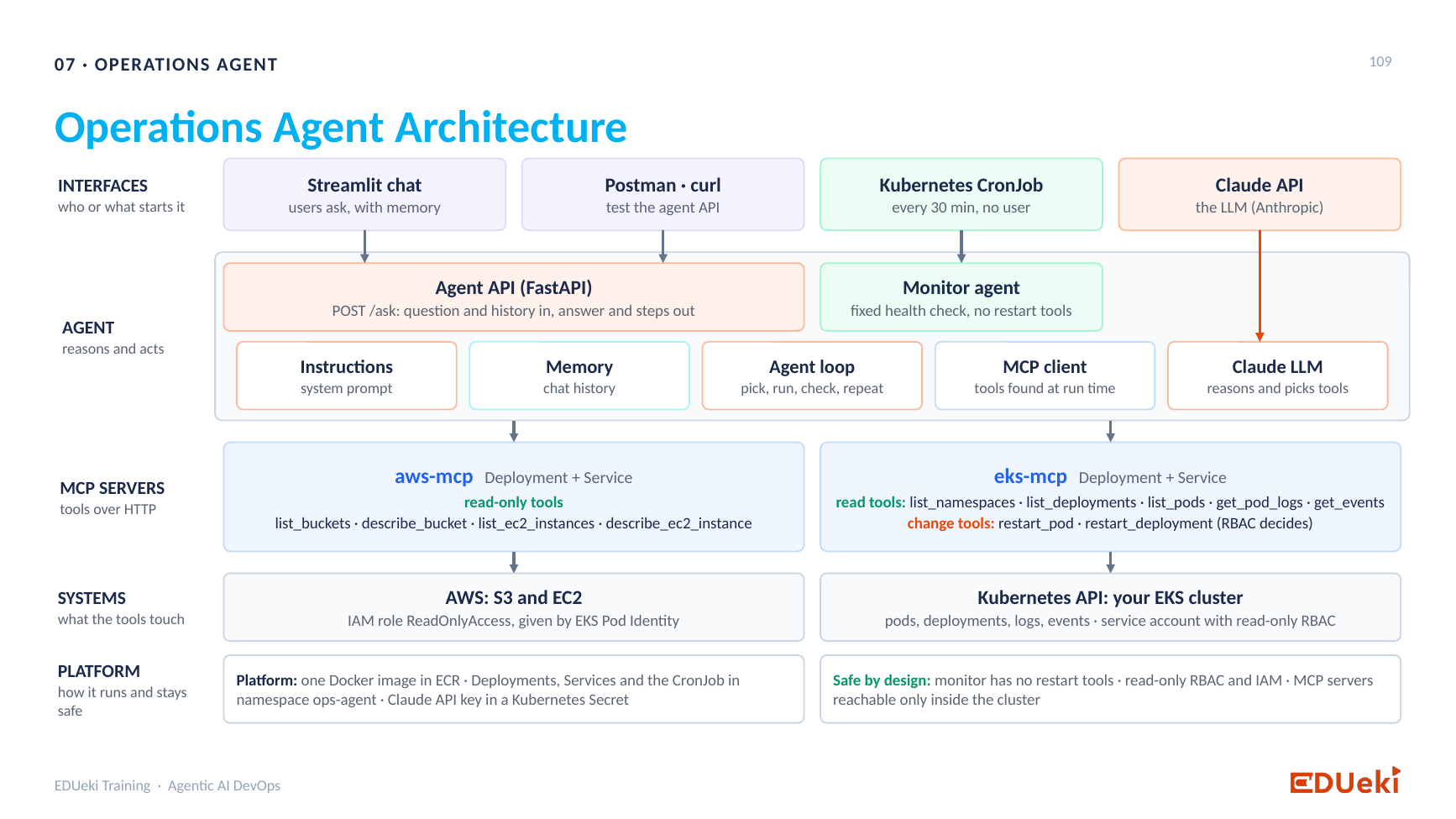
Operations Agent architecture: interfaces, the agent with its components, the MCP servers and the systems they reach
Read the slide from the top:
- Interfaces are who starts the agent. This session used the Agent API with Postman or Swagger. The Streamlit chatbot and the Kubernetes CronJob are the same agent through different interfaces.
- The agent holds the instructions (the system prompt), the MCP client, and the Claude LLM, which is called through the Anthropic API with an API key. Memory and the agent loop are also on the slide, but they are not in this version of the agent.
- MCP servers offer the tools. This session used the Kubernetes one. The AWS one comes next.
- Systems are what the tools touch: the Kubernetes API of your cluster.
The flow of a question: the user posts a question to the agent API. The agent asks the MCP client for the tools, then asks the LLM which one to use. The agent then asks the MCP client again to run that tool. The MCP server runs it on Kubernetes and returns the result. The agent gives the result to the LLM, which writes the answer for the user.
14. Questions from the session
Where does ask come from? Is it related to the earlier MCP tools?
No. /ask is the path the client posts to. It has no relation to the tool names. The name is only meaningful for you. If you called it /xyz, clients would post to /xyz.
This code feels heavy. Can you explain it from the start?
The agent runs as an API and accepts a question at /ask. The steps run in the order of section 10. The code is the simplest agent for a simple use case, and it leaves out exception handling and many good practices. The goal is not to list namespaces. The goal is to understand how an agent accepts a question, finds the tool, runs it through MCP and answers. Listing namespaces is only one simple use case.
Could we do all this with the Claude desktop app and some MCP servers, with no code?
Yes. You configure MCP servers in the desktop app and talk to them, with much less code. That is a different interface. It runs on one machine for one person. When one agent has to serve many people, it must run as an API on a dedicated server (Dockerized and deployed). Some use cases need a chatbot, and some need no interface at all, for example a scheduled agent. The right interface depends on the use case. The desktop-app interface is covered in a later session.
Does the client send the question to the MCP server?
No. The question goes to the LLM, together with the tool list. The MCP server only receives the tool name and inputs that the LLM chose.
15. What comes next
- A Streamlit chatbot as the interface for the agent, instead of Postman.
- The AWS MCP server, with AWS tools next to the Kubernetes ones.
- Another way to run MCP servers, beyond the one used so far.
- Later: the Claude desktop interface, and moving this step-by-step build toward the complete agent.
Summary
Key takeaways
- The agent has three components: the prompt (instructions), the LLM and the MCP client. The LLM reaches the MCP server only through the MCP client.
- You run the agent as an API. A
POSTto/askruns theaskfunction, and a Pydantic model checks thatqueryis a string. - The MCP client uses
async with Client(url)andawait.list_toolsreturns every tool with its name, description and input schema. Keep those three. - First LLM call (intent): send the question and the tool list. The LLM picks a tool and its input. It does not answer yet.
tools_processpicks thetool_useblock.run_toolcallscall_toolon the MCP server, which runs the function on Kubernetes.- Second LLM call (answer): send the question, the tool the LLM chose, and the tool result as a
tool_resultblock. The LLM writes a natural-language answer. Return the block of typetext, not blindlycontent[0]. - Put the API key in
.envand callload_dotenv(), or the client cannot authenticate. - A new tool on the MCP server needs no change in the agent, because the agent discovers tools at run time.
- Read errors and print the data when you are unsure of its shape.
Quick revision
| Term | Meaning |
|---|---|
| Agent | The application that holds the prompt, the LLM and the MCP client |
SYSTEM |
The system prompt: the role of the LLM and what it may do |
Client(url) |
The MCP client. It connects to the MCP server at the URL |
async / await |
Open the connection without blocking, and wait for the server’s reply |
list_tools() |
Asks the MCP server for its tools and keeps name, description and input_schema |
input_schema |
Describes the inputs a tool needs. Empty properties means no input |
| Pydantic model | Checks that the request body has the right shape, here query: str |
| Intent layer | The first LLM call: the LLM reads the question and the tools and picks one |
tool_use block |
The part of the LLM’s reply that names the tool and its input |
call_tool |
The MCP client call that asks the server to run a tool |
tool_result block |
The message that carries the tool’s result back to the LLM, linked by tool_use_id |
.env and load_dotenv() |
Keep the API key in a file and load it into the environment |
Remember: the MCP server runs the tool, the LLM chooses the tool and writes the answer, and the agent connects them.