Agentic AI DevOps: Agentic AI Introduction
Recap of the previous session
- A real RAG project has three parts: the ingestion pipeline keeps the vector DB full and current, the orchestrator is an API service that answers questions from it, and the chatbot UI only calls that API.
- The three parts agree on the vector DB location, the collection name and the embedding model.
- The same orchestrator API can serve a chatbot or an agent.
- The RAG part of the course is complete. The next sessions move to agentic AI.
In this session
- What an LLM can do, and what it cannot do on its own
- What a tool is
- What an agent is, and what it is not
- Why a tool is reached through MCP, and why MCP instead of a plain API
- MCP architecture: server, client, resources, tools and prompts
- How the LLM discovers the right tool by itself
- How to design MCP servers, and what you must run and maintain
In one sentence: an LLM only predicts the next token, so you give it tools (through MCP), memory and instructions, and the whole system working together is an agent.
Topics ahead. This session starts the agentic AI part of the course: AI agent workflows, frameworks, harness engineering, MCP, and how to build MCP servers. This session covers the concepts. Building the MCP tools, server and client comes next.
1. What an LLM can do, and what it cannot
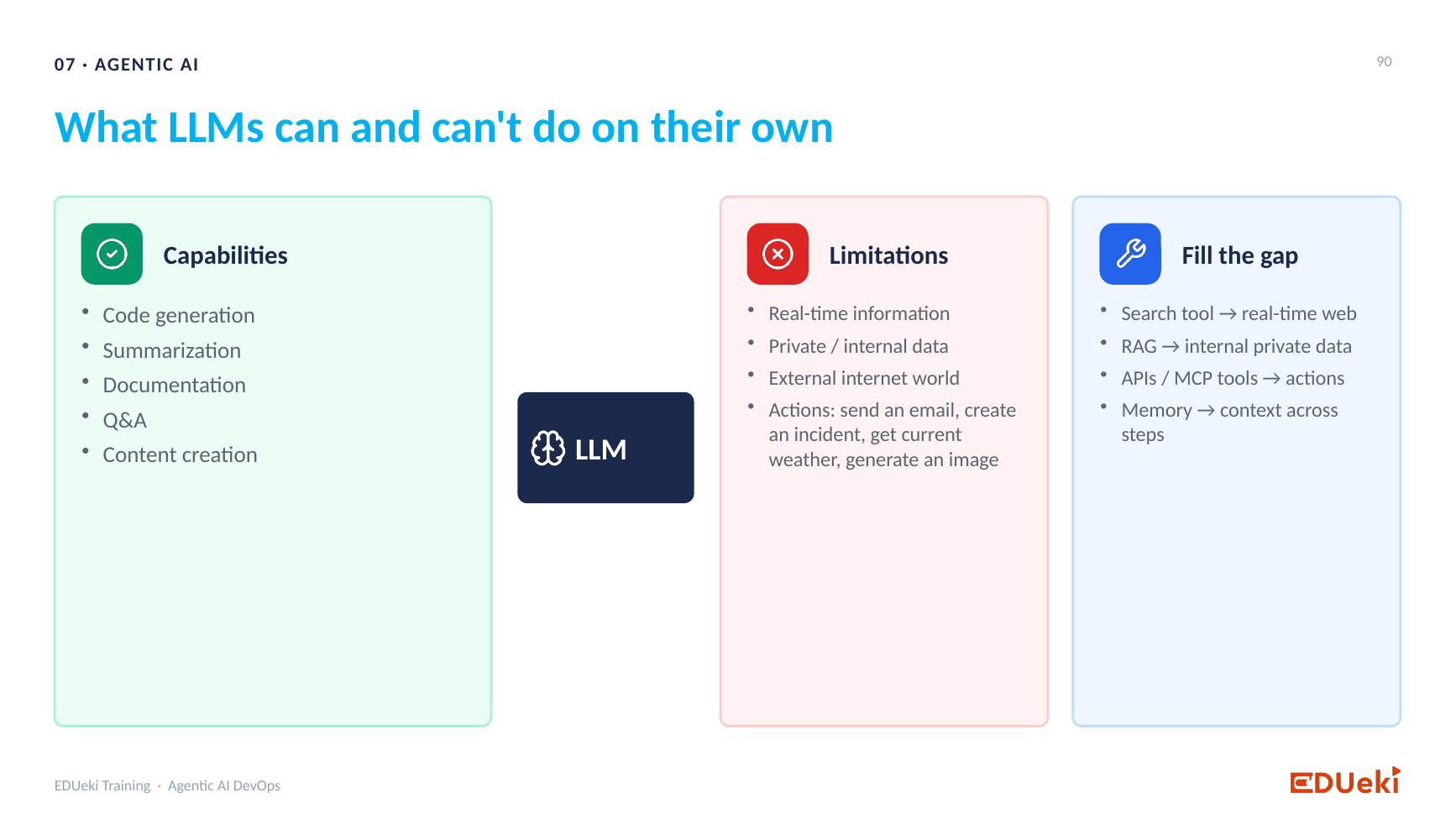
What LLMs can and can’t do on their own: capabilities, limitations and how to fill the gap
An LLM is trained on natural language, so it understands a prompt and can answer it. By default it only knows the data it was trained on. When it needs knowledge it was not trained on, you pass that knowledge in the prompt as context. That is what RAG does: the orchestrator fetches the relevant chunks of your private data and builds a final prompt of the question plus the chunks.
What an LLM can do. Every one of these is the same thing underneath, predicting the next token:
| Capability | Example |
|---|---|
| Code generation | Ask for a script and the model predicts it token by token |
| Summarization | Give a hundred pages and get a summary |
| Documentation | Give a draft and get clean documentation |
| Q&A | Answer a question when it has the context (RAG supplies it) |
| Content creation | Write a story |
What an LLM cannot do on its own:
Private and internal dataThe model was trained on data provided by the vendor, not your organization’s private data.External internet worldIt cannot automatically fetch live data from the internet.ActionsIt cannot directly send an email, create an incident ticket, get live weather, generate an image or video, or check your Kubernetes pod status. This is the gap RAG closes.
| Limitation | Why | ||||
|---|---|---|---|---|---|
| Real-time information | Data may not be in the model’s training data, and the model cannot automatically access live information. | ||||
| Example: it cannot tell you the score of a match that just finished. | |||||
Actions fail because they need a connection to something outside the model: a mail server, the Kubernetes cluster, a weather API, a video tool. The model by itself has one capability, predicting the next token, and no built-in way to talk to an external application.
How the gaps are filled (the right-hand card of the slide):
- RAG gives access to private data.
- Tools (APIs or MCP tools) give access to real-time data and to actions.
- Memory gives context across steps.
2. What is a tool?
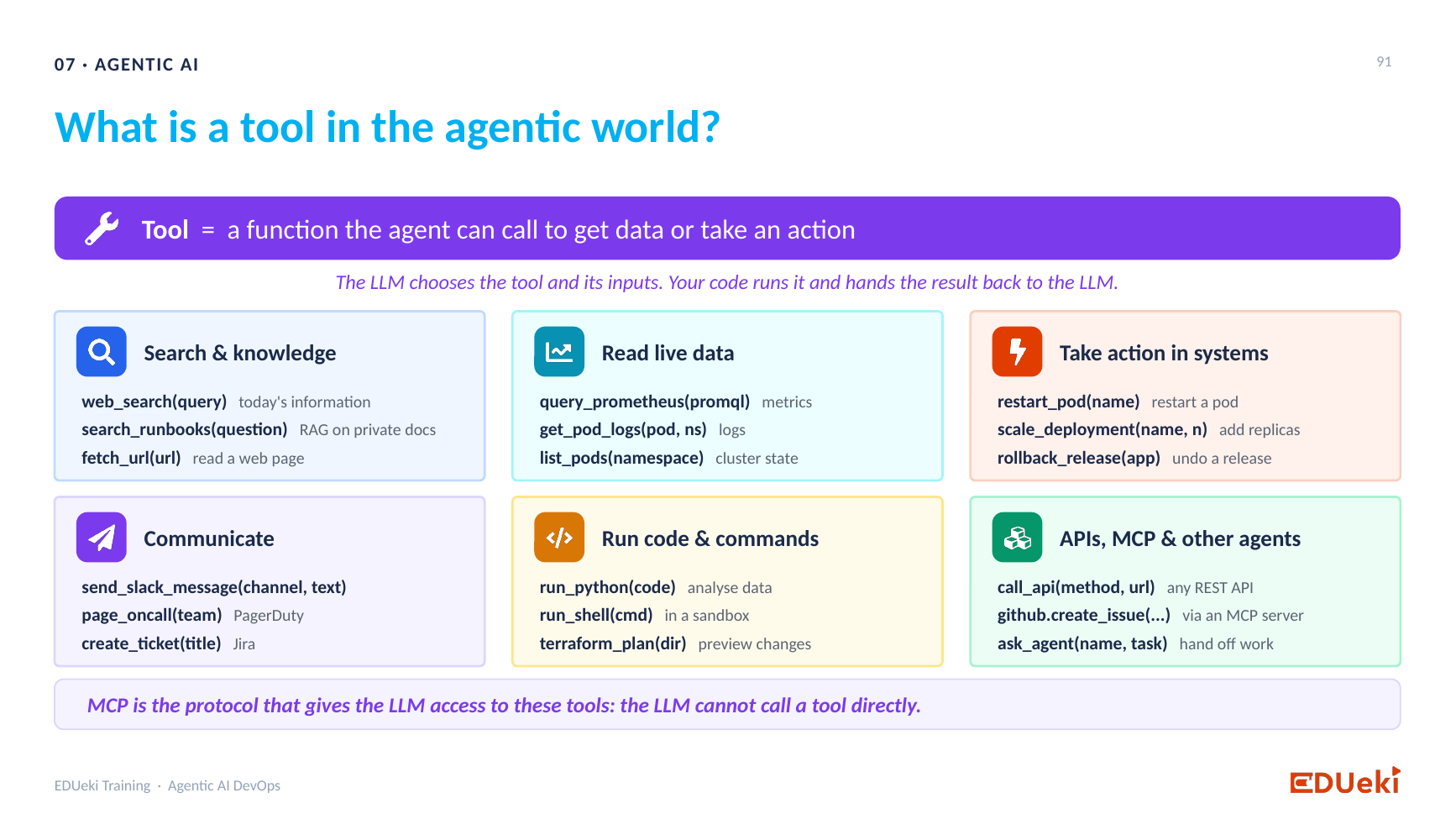
What is a tool in the agentic world: functions the agent can call, grouped by purpose
A tool is a specific function that does one job and gives the result back to the LLM, so the LLM can act on it.
Examples of tools, all external to the LLM:
| Tool | What it does |
|---|---|
| Web search | Brings up-to-date information to the LLM |
| RAG search | Brings your private data |
| Fetch URL | Gives the LLM a web page |
| Send Slack message | Posts to a channel |
| Page on-call (PagerDuty) | Messages the on-call person |
| Create ticket (Jira) | Creates a ticket |
| Query Prometheus, list pods, get pod information | Reads metrics and cluster state |
| Restart pod, roll back an update | Changes the system |
| Analyze data and report | Produces a report |
The LLM does not contain the logic. The tool does. A tool such as create_ticket holds everything needed to connect to Jira. The LLM only uses the tool’s name.
A tool is not an application, it is one action on it.
- Kubernetes is not a tool. It is an application.
- “List namespaces” is one tool. “Create a namespace” is another. “Get the logs of a deployment” is another.
- If you want the LLM to create, delete and list namespaces and get pods, you build that many tools. Five tools means five actions the LLM can perform on your cluster. You decide the actions and write the tools.
Credentials. A learner asked whether the credentials needed to fix Kubernetes issues are the tool. Not just the credentials: the tool is the credentials plus the logic that uses them to connect and get the answer.
In short, a tool is the point of connection between the LLM and another application.
3. LLM and agent: the terminology
If you give the LLM tools to cover its limitations, the system is no longer “just an LLM”. The terminology differs:
AgentAn LLM connected to tools, memory, and instructions to build an application.
| What you have | Meaning | ||
|---|---|---|---|
| LLM | A model with the capability of predicting the next token. | ||
| Nothing more. | |||
If someone says “I use an LLM in my project”, they use a model that predicts the next token. If they say “I use an agent”, they connect an LLM to tools.
In an interview. If you are asked “What are the limitations of an LLM?”, still list the limitations (real-time data, private data, the internet, actions). Do not answer “there are none because tools fix them”. If the next question is “How do you mitigate them?”, the answer is: connect the LLM to tools so it can reach external applications, and that system is called an agent.
4. The components of an AI agent
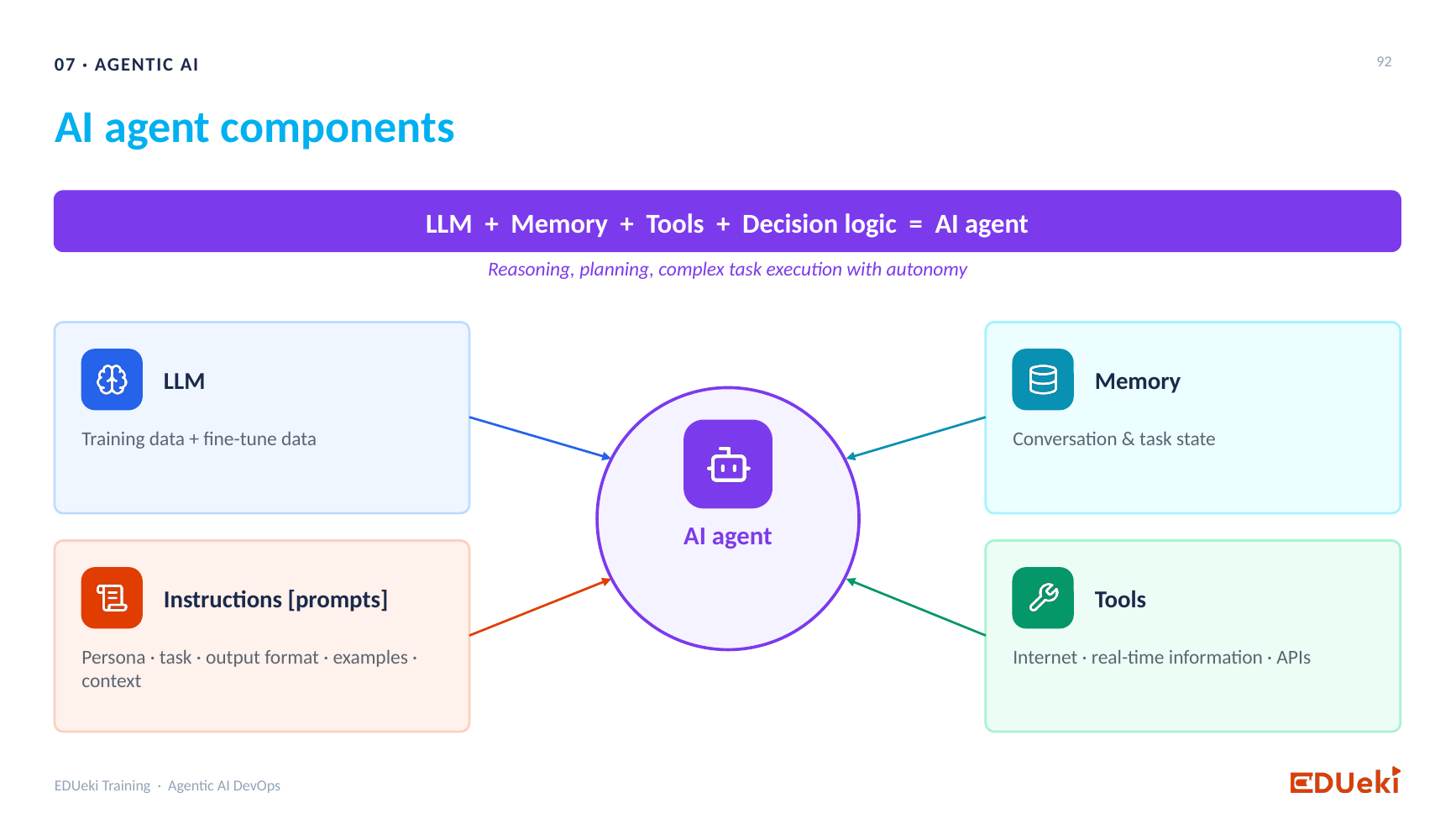
AI agent components: LLM, memory, tools and instructions
Build the agent one layer at a time:
- LLM, the brain. It understands natural language and predicts the next token.
- Prompts, the instructions. A good prompt (using prompt engineering) sets the role, tone, behavior, rules and guardrails: what the LLM should do for this use case. This is the decision logic of the agent: your requirements, written as instructions.
- Memory. An LLM has no memory of its own. Ask a follow-up and it does not remember the first question. You build the memory outside the model: the conversation layer keeps appending each new question to the earlier questions and answers, and sends that as the new prompt. That is the orchestration layer you saw in the RAG sessions.
- Tools. They let the LLM reach the internet, real-time data and external applications.
When a use case combines LLM, prompts, memory and tools, that is an AI agent.
An agent can reason (analyze the problem), plan (break it into a sequence of tasks) and execute those tasks with autonomy, without you giving step-by-step instructions.
DevOps example. An agent that looks for failed pods in Kubernetes:
- The LLM connects to Kubernetes through MCP tools.
- It follows the instructions in the system prompt (or the user prompt in a chatbot).
- It uses its memory to understand context.
- It finds the failure, works out why it failed, plans the steps to fix it and executes them, for example restarting the pod, without you telling it each step.
Is my RAG chatbot an agent?
No. In the RAG chatbot a question goes to the vector DB, the chunks go to the LLM and the LLM composes an answer. It is a quick question and answer. It had memory but no MCP tools. An agent needs the LLM, prompts, memory and tools.
Is an agent something I install?
No. “Agent” is the term for the application you build, the way DevOps is a term for a process. You do not install DevOps as a product. You install Jenkins, SonarQube and the other tools and wire them together. An agent is the same: you prepare the prompt, write the memory code, build or install the MCP tools, call the LLM, and wire the pieces into one application. Then you package it, deploy it and run it.
Why MCP is the focus. You already know the LLM, prompts and memory. The only new piece is the MCP tool. If you know what an MCP tool is, how to build one with its server and how to give the LLM access to it, you can build an agent for any use case. MCP is the main pillar of agentic AI.
5. What is MCP?
An LLM cannot call a tool directly. It reaches the tools through MCP, the Model Context Protocol. MCP is the connector between the tools and the LLM: the LLM goes through MCP to find a tool, execute it and get the result.
Why not just call the API? Think of API and MCP as two ways to connect one application to another. APIs are the usual way. MCP is the replacement for AI applications, because LLMs reach applications through MCP. An LLM can be given an API, but that is not how agentic applications are built.
A reminder of what an API is: an application listening on a port. A client sends a request in a fixed format over HTTP, and the API processes it and replies. Each API has its own schema. Send a different schema and the request fails.
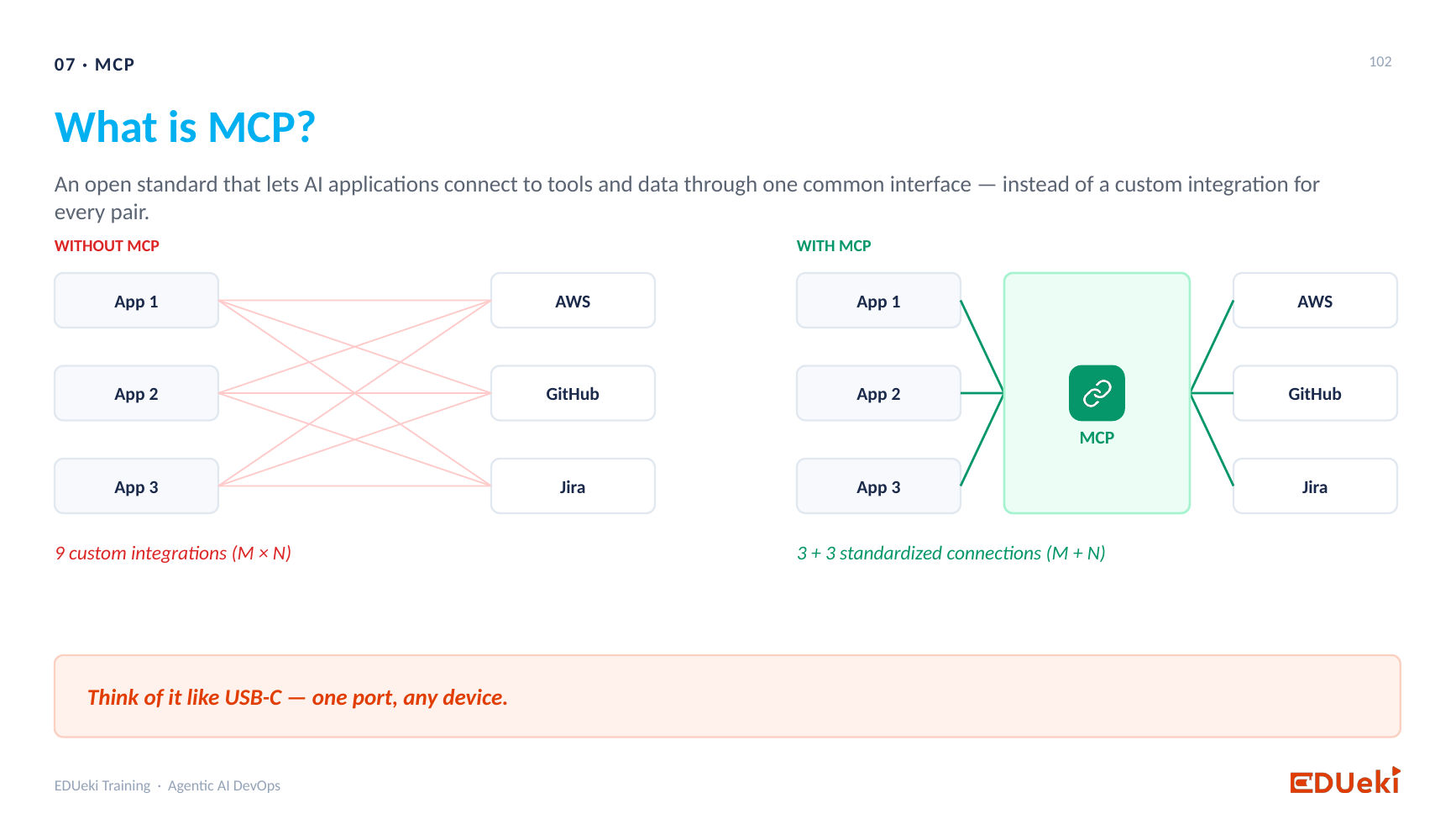
What is MCP: nine custom integrations without MCP, three plus three standard connections with MCP
Without MCP: the API world
Take three applications (App 1, 2, 3) and three vendors (AWS, GitHub, Jira):
- App 1 needs an AWS API client, a GitHub API client and a Jira API client. Each has its own code, built to the exact schema of that vendor’s API.
- App 2 and App 3 need the same three clients.
- That is nine custom integrations (3 × 3), nine pieces of code to write and maintain.
- If AWS changes an endpoint or a schema, you change the AWS client in App 1, App 2 and App 3.
Lots of code, lots of maintenance, and a strict schema to follow on the client side.
With MCP
- For each vendor you have an MCP server. It connects to the back-end tool.
- MCP is a standard, open protocol. Every application uses the same MCP client the same way.
- The applications need no custom code per vendor. You tell the client: “this is my MCP server endpoint”, and it connects.
- That is 3 + 3 standard connections (M + N) instead of nine custom integrations. Less code and less maintenance.
Added for clarity. At run time App 1 still talks to three servers, so the number of live connections is the same in both pictures. What shrinks is the custom code: nine one-off clients become three servers plus the one standard MCP client every application already uses.
Without AI? Yes, MCP still works if you replace an API with an MCP server in a non-AI application. But you do not get its maximum benefit. MCP is built mainly for AI applications.
6. MCP architecture
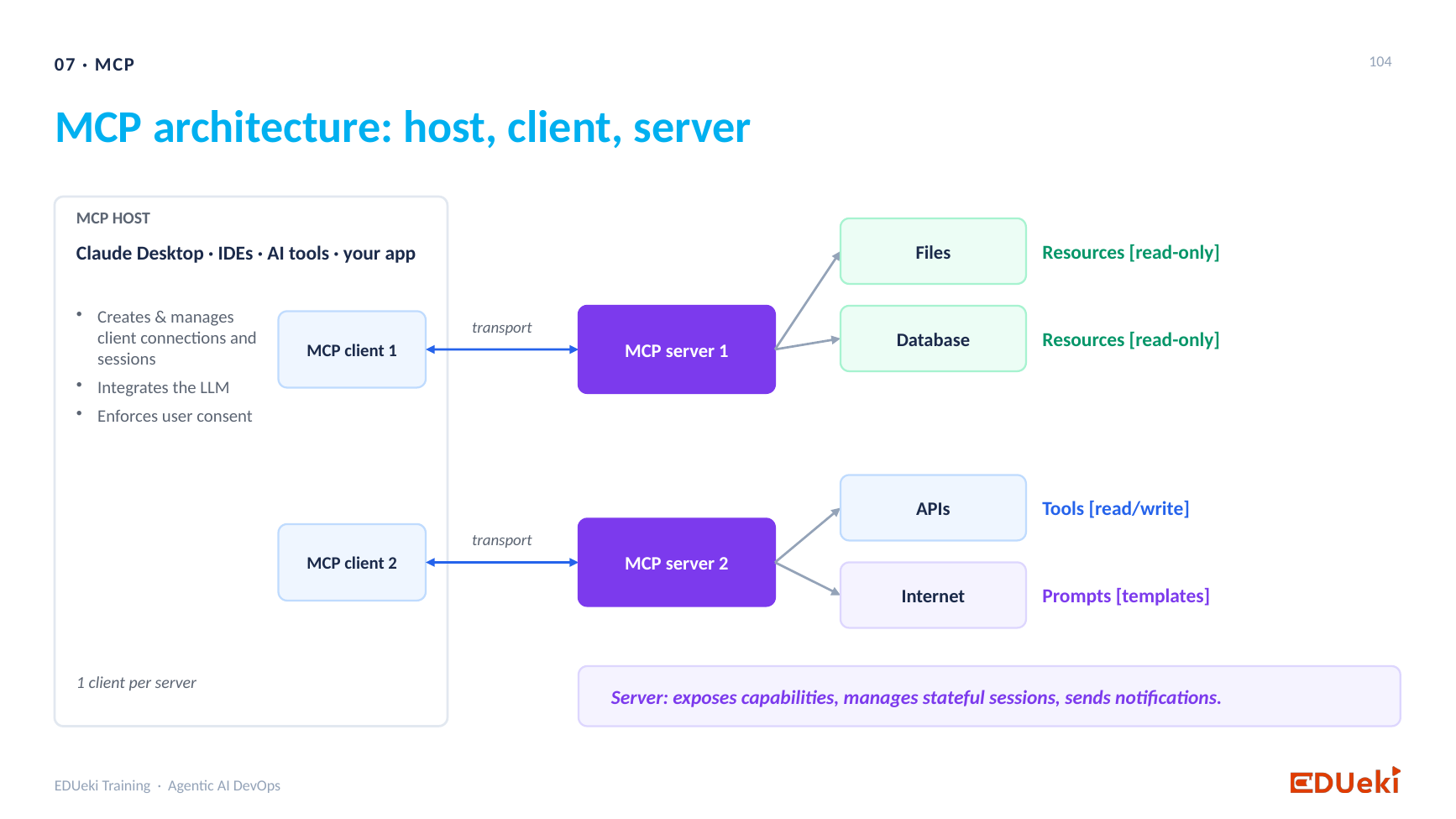
MCP architecture: host, clients, servers, resources, tools and prompts
The requirement: the LLM must reach files, databases, the internet and external applications. MCP provides this through three kinds of capability:
| MCP capability | What it is | Access |
|---|---|---|
| Resources | Anything you give the LLM as read-only access: files, databases | Read-only |
| Tools | Anything you give the LLM to act with: APIs, restarting a pod | Write |
| Prompts | Templates or instructions you give the LLM | Templates |
The MCP server is like a FastAPI application: it runs on a specific port and listens. You register your resources, tools and prompts with it. Then you tell the LLM to use them through that server.
The MCP client sits on the LLM side. It is how the LLM talks to the server:
- The LLM asks the MCP client to call a tool.
- The client connects to the MCP server.
- The server runs the tool against the back-end resource or application.
- The result comes back through the server and client to the LLM.
- The LLM uses the result to decide what to do next.
Example. “Create a Kubernetes pod” is a tool registered with the MCP server. In a chatbot you say “please restart the pod”. The LLM uses the MCP client to ask the server to run the restart tool. The tool runs, the response comes back, and the chatbot tells you the pod is restarted.
One client per server. One MCP client does not connect to several servers. Each MCP server has its own client connection, as shown on the slide (“1 client per server”). You decide how many servers to build. Files, databases, APIs and prompts can go in one server, or two, or three. Your design decides. But for every server you build you need its client.
Who needs a client? Any application that wants to use MCP resources, tools or prompts runs an MCP client. In practice that is the agent application where the LLM sits, not every microservice. The MCP server is the part that connects to the back-end resource or tool, runs it and returns the response to the caller.
Does the tool know who is calling? No. Each tool is just a Python function. When it is called, it runs the code you wrote and replies. Like an API, it receives a request on its port and executes it. If you want a check, you can add one in your logic.
7. Discovery: the main benefit of MCP
With an API, you must write the code for every action: this is the endpoint for AWS, this is the endpoint to create a Jira ticket, this is the schema, this is the input. Out of a hundred APIs, the application does not work out which one to call.
With MCP, the LLM discovers the tools by itself. No wiring code on the client side. When you tell the chatbot “please restart the pod”:
- The LLM asks the MCP server, through the client: give me the list of tools you have.
- The server returns every registered tool with its name, description and schema. Say there are a hundred tools: some for AWS, some for Kubernetes, some for Jira, some for a database.
- The LLM reads the descriptions and decides which tool fits the request.
- It then tells the server which tool to execute, with the input.
- The server executes it and returns the result.
A real example: “Restart my payment service”. You did not give the deployment name or the cluster. The LLM:
- Reads the list of tools and sees that it first needs the deployment.
- Asks the server to run the list deployments tool.
- Finds the payment service in the result, because the LLM has a brain.
- Asks the server to run the restart deployment tool.
So the LLM decides which tools to call, in which order, from the descriptions the server registered. That is how an agent is autonomous. If you give the deployment name, cluster name and pod name in the prompt, it is simpler still. Prompt engineering lets you steer how specific the request is.
The quality of the tools decides the quality of the agent. The better your MCP servers and tools, the better the agent can plan and execute.
8. Designing MCP servers
Is there a limit on tools per server? There is no hard limit. It is a design choice, as with an API: how many calls it handles depends on traffic and on the CPU and memory you give it. A hundred tools on one server puts a lot of routing load on it, so you may split it into two servers.
The usual best practice: one MCP server per product.
- All AWS actions in one server, all Kubernetes actions in one server, all Jira actions in one server.
- Inside the AWS server you can have resources (read-only access), tools (write access) and prompts, for S3, RDS, Route 53 or a load balancer. It does not matter, as long as it is all AWS.
- Each product has its own credentials and its own connection. One server per product makes that connection easy to handle and the servers easy to maintain.
You must run it. An MCP server is an application, like an API. It needs its own infrastructure and high availability, deployed and kept running on a server. If the MCP tool for Kubernetes is not reachable at run time, the agent cannot work.
You may not have to build it. Most vendors already provide their own MCP server. You take the vendor’s MCP server, give the LLM an MCP client for it, and it works, with almost zero code. If no MCP server exists for your tool, you build your own.
9. Questions from the session
Are agent tools the same as an agent?
No. A tool is one function the agent calls. The agent is the whole application (LLM, prompts, memory and tools).
Does the LLM now have no limits, since tools fill the gaps?
With tools it can do almost every task, but you still state the limitations of an LLM when asked, and then explain how tools mitigate them (section 3).
In Nagios or Datadog an agent is installed on each server. Is an AI agent installed on each server too?
No. An AI agent is not a package you install. It is an application you build from a model, prompts, memory and tools, like a DevOps pipeline built from Jenkins and other tools.
What if there is no MCP server for the tool, for example for Kubernetes?
You build it. And if at run time the server is not reachable, the agent cannot use that tool.
Do tools need to check that the MCP server is calling them?
No. A tool is a Python function. It runs when called.
10. What comes next
- The next session builds MCP tools, an MCP server and an MCP client, and connects the client to the server to run the tools. The LLM is not connected yet.
- The session after that connects the LLM to this flow, so the whole agent works.
- Then you will see how ready-made MCP servers from vendors speed up development.
Summary
Key takeaways
- An LLM does one thing, predicts the next token. It can generate code, summaries, documents and stories, and answer questions when given context.
- An LLM cannot give real-time information, see private data, reach the internet, or perform actions such as sending an email, creating a ticket or checking a pod.
- RAG gives private data. Tools give real-time data and actions. Memory gives context across steps.
- A tool is a specific function that does one action and gives the result back to the LLM. Kubernetes is an application, “list namespaces” is a tool.
- A tool is the point of connection to another application, including the credentials and the logic that uses them.
- LLM plus tools is an agent. A full agent is an LLM, prompts (decision logic), memory and tools together, which can reason, plan and execute tasks with autonomy.
- A RAG chatbot with no MCP tools is not an agent. An agent is not installed, it is an application you build and wire together.
- In an interview, still name the LLM’s limitations, then explain tools as the mitigation.
- An LLM cannot call a tool directly. It goes through MCP, the Model Context Protocol.
- Without MCP, three applications and three vendors need nine custom clients. With MCP it is 3 + 3 standard connections, and no custom code per vendor on the client side.
- MCP has resources (read-only), tools (actions) and prompts (templates), served by an MCP server (like a FastAPI app on a port) and reached by an MCP client, one client per server.
- With MCP the LLM discovers the tools by itself: it lists the tools, reads their descriptions, picks the right ones and decides the order.
- Best practice is one MCP server per product. Run it with its own infrastructure and high availability. Use the vendor’s server when there is one, and build your own when there is not.
Quick revision
| Term | Meaning |
|---|---|
| LLM | A model that predicts the next token. The brain. |
| Tool | A function that performs one action on an external application and returns the result to the LLM. |
| Agent | An application built from an LLM, prompts, memory and tools, which can reason, plan and act on its own. |
| Prompt (instructions) | The role, tone, rules and guardrails that tell the LLM what to do. |
| Memory | Earlier questions and answers kept outside the LLM and sent back in each new prompt. |
| MCP | Model Context Protocol, the open standard that connects an LLM to tools and data. |
| MCP server | An application (like a FastAPI app) listening on a port, with resources, tools and prompts registered. |
| MCP client | The part of the application that connects the LLM to an MCP server. |
| Resource | Read-only access to files or databases through MCP. |
| MCP tool | A function that performs an action through MCP. |
| MCP prompt | A template or instruction offered through MCP. |
| Discovery | The client asks the server for its tools, reads their names, descriptions and schemas, and makes them available to the LLM for selection. |
| 9 vs 3 + 3 | Nine custom API clients versus three MCP servers plus one standard MCP client. |
Remember: the LLM is the brain, the tools are its hands, MCP is the connector, and the agent is all of them wired together to meet your requirement.