Agentic AI DevOps: RAG Project – Part 1
Recap of the previous session
- The
systemrole sets the LLM’s role and rules, theuserrole carries the question, and theassistantrole is an earlier LLM reply. A chatbot needs theassistantrole because it sends the earlier replies back with every new question. - An LLM has no memory. A longer conversation means more input tokens, a higher bill and a growing context window.
- An LLM only knows its training data, so it cannot answer about your private data, such as runbooks. You cannot paste hundreds of pages into every prompt.
- RAG stores your documents in a vector database as embeddings. For a question, the database returns the closest pieces by distance, and the LLM writes the final answer from them.
In this session
- Installing ChromaDB and using its built-in embedding model
- The distance between two pieces of text
- Collections, and the four fields of a stored item: id, document, embedding, metadata
- Semantic search with
query, and how it differs from the lexical search of a normal database - Chunking: why a big document is cut, and four ways to cut it
- Chunking a runbook, storing it on disk and searching it
- The first full pipeline: question, vector DB, prompt, LLM, answer
- What the orchestrator is, and what RAG cannot do
In one sentence: you split your documents into chunks, store each chunk in a vector database as an embedding, and for every question the database returns the closest chunks by meaning, which you hand to the LLM so it can write the answer.
1. Choosing and installing a vector database
Many vector databases can store text as embeddings. They differ in vendor and in how you use them, but the purpose is the same. This session uses ChromaDB, but any of them would work. The ChromaDB documentation has tutorial pages that are worth reading later.
Install it like any Python package. A database such as MySQL or Oracle has to be installed too, and what you install here is the database that stores embeddings.
%pip install chromadb
2. The built-in embedding model
ChromaDB comes with an embedding model, so it can turn your text into vectors itself. You can bring your own model, but the default one is enough here.
from chromadb.utils import embedding_functions

embed = embedding_functions.DefaultEmbeddingFunction()
Take three short texts. Each one stands for a document:
sentences = [
    "The pod keeps restarting",
    "The container crashes again and again",
    "Chocolate cake recipe",
]

vectors = embed(sentences)
Here each document is one line, to keep the demo small. In a real system each one could be a runbook of 100 pages. vectors now holds three embeddings, one per document. Each embedding is a list of 384 numbers, because that is the size of the default model’s output. The earlier sessions on embeddings explained what such a vector is.
3. Measuring the distance between two documents
To see how close two documents are, compare their vectors. ChromaDB has a cosine function built in:
from chromadb.utils.distance_functions import cosine

print(cosine(vectors[0], vectors[1]))     # pod restarting vs. container crashing
print(cosine(vectors[0], vectors[2]))     # pod restarting vs. chocolate cake
0.44666945934295654
0.9017191529273987
vectors[0]is the first embedding in the list. It is an index, and it starts at 0.- The result is a distance score. It works the opposite way from cosine similarity. A small distance means similar, and a large distance means different.
- The pod sentence and the container sentence are close (0.45). Both describe the same kind of problem.
- The pod sentence and the cake sentence are far apart (0.90). One is about Kubernetes, the other about food.
- The calculation is done on the numbers, not on the text. That is why the text is converted to embeddings first.
- ChromaDB uses cosine in the background, and it reports a distance rather than a similarity.
4. A collection: where the data is stored
So far the vectors only exist in a Python variable. To keep them, you need a database. If you know MySQL or Oracle, the idea is the same:
| MySQL / Oracle | ChromaDB |
|---|---|
| You connect with a client | You create a client |
| You create tables | You create a collection |
| You insert rows | You add items to the collection |
import chromadb

client = chromadb.Client()

collection = client.get_or_create_collection(name="runbook", metadata={"hnsw:space": "cosine"})
get_or_create_collectioncreates the collection, or reuses it if the name already exists. You can have several collections in one database."hnsw:space": "cosine"is a setting that tells ChromaDB to use the cosine distance when it searches this collection.chromadb.Client()keeps everything in memory, so the data is gone when the notebook stops. Section 10 stores it on disk.
5. What a collection stores
Every item you add has four fields, like the columns of a table:
| Field | What it holds | Who creates it |
|---|---|---|
| id | A unique identifier for the document | You |
| document | The actual text, exactly as it is | You |
| embedding | The embedding of that text | ChromaDB, with its built-in model |
| metadata | Extra information about the document, such as the topic, the business, the asset or the environment | You |
Why both the document and its embedding? The embedding is what the search uses: it decides whether the document is a semantic match. But a database cannot answer with a list of numbers. When there is a match, the original text is what comes back to you. Metadata is for filters later, for example “only the documents about production”.
Prepare the three lists. They line up by position: the first id, the first document and the first metadata belong to the first item.
ids = ["runbook-01", "runbook-02", "runbook-03"]

documents = [
    "The pod keeps restarting",
    "The container crashes again and again",
    "Chocolate cake recipe",
]

metadatas = [
    {"topic": "kubernetes"},
    {"topic": "containers"},
    {"topic": "recipe"},
]

collection.add(ids=ids, documents=documents, metadatas=metadatas)
collection.count()
3
You do not create the embeddings yourself. When you add the documents, ChromaDB converts each one with its built-in model and stores the embedding in the embedding field.
peek() shows what is stored:
collection.peek()
{'ids': ['runbook-01', 'runbook-02', 'runbook-03'],
 'embeddings': array([[ 0.08224185, -0.07428452,  0.05886556, ..., -0.00775459, ...]], shape=(3, 384)),
 'documents': ['The pod keeps restarting',
  'The container crashes again and again',
  'Chocolate cake recipe'],
 'metadatas': [{'topic': 'kubernetes'}, {'topic': 'containers'}, {'topic': 'recipe'}], ...}
You see the three ids, the three documents, the three metadata dictionaries and three embeddings of shape (3, 384). To read one item, use get with its id and say what to include:
item = collection.get(ids=["runbook-01"], include=["documents", "metadatas", "embeddings"])
The result holds that one id, its 384-number embedding, its text and its metadata.
6. Semantic search with query
Now ask a question. You send the text of the question to the collection, and say how many results you want:
question = "The app crashes over and over after the deployment"

results = collection.query(query_texts=[question], n_results=3)

for i in range(3):
    print(round(results["distances"][0][i], 2), "|", results["documents"][0][i])
0.48 | The container crashes again and again
0.63 | The pod keeps restarting
0.99 | Chocolate cake recipe
What happened inside:
- ChromaDB converted the question into an embedding with its built-in model.
- It calculated the distance between the question and every stored document.
- It sorted them and returned the closest ones.
| Document | Distance | Why |
|---|---|---|
| The container crashes again and again | 0.48 | The question is about a crash |
| The pod keeps restarting | 0.63 | A restarting pod is somewhat related |
| Chocolate cake recipe | 0.99 | Nothing to do with the question |
n_results=1returns only the best match,n_results=2the best two, and so on. A result holds the id, the document, the metadata and the distance.- If you ask for more results than there are documents, you get all of them. With three documents,
n_results=10returns three. - The question did not share words with the best match, except “crash”. The search compares meaning.
Here is a stronger proof. Ask a question that has no word in common with any document:
question = "I want to know how to prepare my sweets?"

results = collection.query(query_texts=[question], n_results=3)
results
{'ids': [['runbook-03', 'runbook-02', 'runbook-01']],
 'documents': [['Chocolate cake recipe',
   'The container crashes again and again',
   'The pod keeps restarting']],
 'metadatas': [[{'topic': 'recipe'}, {'topic': 'containers'}, {'topic': 'kubernetes'}]],
 'distances': [[0.5767015218734741, 0.9677658081054688, 0.9706384539604187]]}
The cake recipe comes first, at 0.58, while the other two are near 0.97. The question talks about sweets and the document talks about a cake, so the meaning is close.
Lexical search and semantic search
| Lexical search (a normal database) | Semantic search (a vector database) | |
|---|---|---|
| It looks for | The same word | The same meaning |
| Example | Search “car”: documents with the word automobile are not returned | Search “car”: documents about an automobile are returned |
| If the word is missing | “No documents found” | The closest meanings are returned |
A query like WHERE text LIKE '%pod%' in MySQL returns a row only if the word is there. A vector database compares embeddings, so it works from the meaning of the statement. Web search has been moving the same way: from matching the exact word to matching the meaning.
7. Real documents: one document or many chunks?
A one-line document is a demo. A real document has many lines, and you have to decide how to store it.
An incident report. Suppose a document describes one incident: an id, a title, the issue, the root cause and the resolution. It is about one thing, so it should be stored as one document. Later, when a new incident arrives, you can ask whether a similar one exists, and the vector DB returns the earlier incident and how it was fixed.
A troubleshooting guide. Now take a runbook that has the steps for CrashLoopBackOff, then for OOMKilled, and for many other problems. It has many topics. If you store it as one document:
- The embedding covers everything in it, so the distance to a specific question gets worse.
- A question about a 5xx error returns the whole document, although only one part of it matters.
- Sending that to an LLM means more input tokens and more delay, for text the question did not need.
So you split the document into chunks, and store each chunk as a separate document. Then the search can return only the chunk that matches.
8. Four ways to chunk a document
| Strategy | How it cuts | Good | Problem |
|---|---|---|---|
| Fixed size | Every N characters, for example 100 | Easy, automatic | It cuts through anything. One incident can end up half in one chunk and half in the next, so no chunk has the complete information |
| Recursive | At natural breaks: paragraphs first, then line breaks, then spaces | Automatic, keeps paragraphs together | It follows layout, not meaning. If one incident is written as two paragraphs, they may land in two chunks |
| Semantic | By meaning, so the content about one topic stays in one chunk | Chunks match topics | You write your own code |
| Structure based | By the structure of the document: all the content under heading 1 is one chunk, under heading 2 the next | Works well for documents with proper headings | You write your own code |
- Fixed size and recursive chunking are almost automatic: you choose the strategy and a library does the work.
- Semantic and structure-based chunking need your own code to split the document.
- Which strategy gives the best result depends on your data and its format. You experiment and compare.
- It all depends on the quality of the document. A document with a proper structure is easy to chunk. A badly structured document gives wrong chunks, wrong distance scores and answers full of text nobody asked for.
Who does what in a company
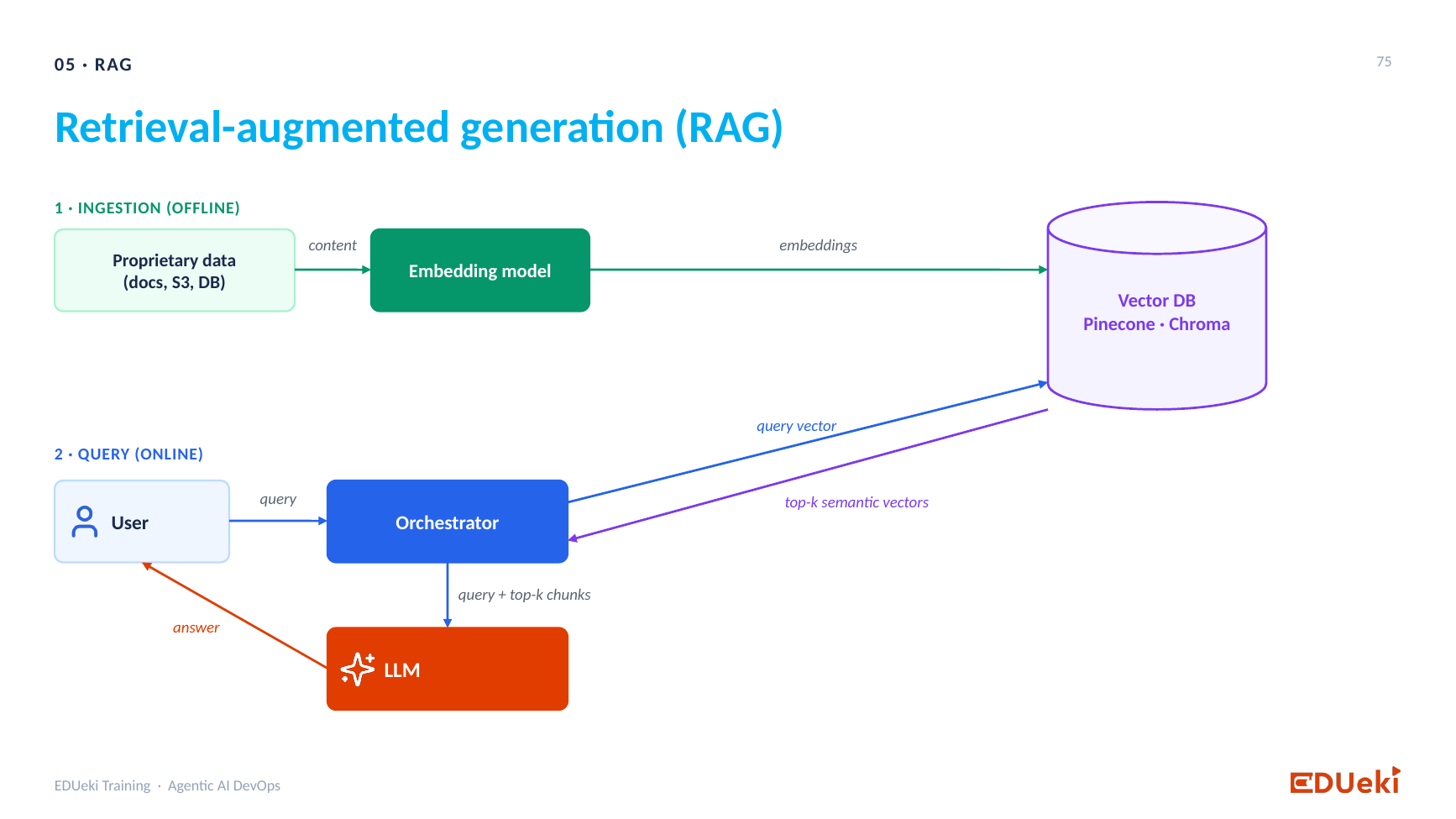
RAG architecture: ingestion (proprietary data, embedding model, vector DB) and query (user, orchestrator, vector DB, LLM)
Look at the two halves of the picture again.
- Ingestion (step 1) is a continuous job. Today the data goes into the vector DB, and tomorrow someone writes new documents that must go in as well. One team usually owns this ingestion pipeline: it chooses the chunking strategy, experiments with it and keeps loading the business documents.
- Query (step 2) is owned by another team. It builds the chatbot, accepts the user’s question, gets the chunks that the ingestion team stored, and uses the LLM to write the answer.
This session builds the ingestion half first, and then a first version of the query half in the notebook.
9. Chunking the runbook in code
The runbook is a Markdown file. Read it like any text file:
file = "wiki_pages/edshopper-runbooks.md"

text = open(file, encoding="utf-8").read()
It is long, and one document of that size would give poor search results. Split it with RecursiveCharacterTextSplitter from the langchain-text-splitters library:
%pip install langchain-text-splitters
from langchain_text_splitters import RecursiveCharacterTextSplitter

splitter = RecursiveCharacterTextSplitter(chunk_size=500, chunk_overlap=50)

chunks = splitter.split_text(text)
len(chunks)
43
chunk_size=500is the largest a chunk may be, in characters.chunk_overlap=50repeats the last 50 characters of one chunk at the start of the next. The overlap links a chunk to the one before it, so the text at a border is not lost.chunksis a list of strings. The first is chunk one, the second is chunk two, and so on.- The runbook is now 43 chunks. Each one will be stored as a separate document.
Add the title to every chunk. All 43 chunks come from the same runbook. A chunk alone does not say that, so put the title in front of each chunk. This is part of the data preparation that the ingestion team does:
title = "edshopper rubook"

documents = []
for chunk in chunks:
    documents.append(title + "\n" + chunk)
Every document now starts with the title and then the chunk text.
10. Storing the chunks in a database on disk
So far the data was in memory. PersistentClient keeps it in a folder:
import chromadb

client = chromadb.PersistentClient(path="chroma_db")

collection = client.create_collection(name="runbookdata", metadata={"hnsw:space": "cosine"})

print("Collection ready. Items inside:", collection.count())
Collection ready. Items inside: 0
- The folder
chroma_dbappears next to the notebook. It holds the database filechroma.sqlite3. This is your database on the local disk. - The new collection is empty: 0 items.
create_collectiongives an error if the name already exists, so remove the folderchroma_dbif you run this cell a second time.
You need an id and a metadata dictionary for each of the 43 chunks. Do not type them. Build them in a loop:
ids = []
metadatas = []
for number in range(len(documents)):
    ids.append(f"{file}-{number + 1}")
    metadatas.append({"file": file, "title": title})
The id is the file name plus a number, such as wiki_pages/edshopper-runbooks.md-1. The naming convention is your choice. The metadata says which file and which title each chunk came from. Now add everything:
collection.add(ids=ids, documents=documents, metadatas=metadatas)

print("Collection ready. Items inside:", collection.count())
Collection ready. Items inside: 43
One runbook is now 43 searchable documents.
11. Searching the runbook
results = collection.query(query_texts=["Pods keep restarting. What should I check first?"], n_results=1)
results
{'ids': [['wiki_pages/edshopper-runbooks.md-5']],
 'documents': [['edshopper rubook\n## Pod in CrashLoopBackOff: diagnosis and fix\n1. List the pods and their restarts: `kubectl get pods -n checkout`\n2. Look at the reason and the exit code: `kubectl describe pod checkout-api-6d8f7c9b5-x2k4p -n checkout` and read "Last State".\n3. Read the log of the container that crashed: `kubectl logs checkout-api-6d8f7c9b5-x2k4p -n checkout --previous`\n4. Exit code 137 means OOMKilled. Exit code 1 means the application raised an error: read the last lines of the log.\nFix:']],
 'metadatas': [[{'file': 'wiki_pages/edshopper-runbooks.md', 'title': 'edshopper rubook'}]],
 'distances': [[0.35126930475234985]]}
Out of 43 chunks, the closest one is chunk 5, at a distance of 0.35. It is the CrashLoopBackOff diagnosis, which talks about restarting pods. The vector DB did what it is for: it found the part of the runbook that is about this question.
12. From the retrieved chunks to the final answer
This answer is a dictionary with ids, documents, metadata and distances. You cannot hand that to a user. The next step sends the retrieved text to an LLM, so the LLM can write a proper answer.
Retrieve the top 4. Ask for four chunks instead of one, to give the LLM more to work from, and print the distance and the heading of each:
question = "Pods keep restarting. What should I check first?"

results = collection.query(query_texts=[question], n_results=4)

for i in range(4):
    distance = round(results["distances"][0][i], 2)
    first_line = results["documents"][0][i].splitlines()[1][:60]     # the first line after the title
    print(distance, "|", first_line)
0.35 | ## Pod in CrashLoopBackOff: diagnosis and fix
0.35 | ## Pod in CrashLoopBackOff: symptoms and causes
0.36 | ## Container OOMKilled: symptoms and causes
0.42 | ## Container OOMKilled: diagnosis and fix
All four chunks are about restarting containers. The two CrashLoopBackOff chunks come first.
The system prompt sets the LLM’s role and rules:
system_prompt = """You are the Platform Operations Assistant. You help an operations team with incidents
and platform questions, using the wiki pages that are given to you.
Answer the question using ONLY these wiki pages.

Rules:
- For an incident or a problem: give short, numbered steps and include the exact commands from the pages.
- For a question about servers, databases or configuration: give the exact value from the pages.
- If the page says an action needs approval, say so clearly.
- If the pages do not contain the answer, say: I could not find this in the wiki.
- Never invent commands, numbers or names.
- Finish with one line: Source: <page title>"""
The user prompt holds the context (the actual data the vector DB returned) and the question. From the result you only need the documents part, not the ids, the metadata or the embeddings:
context = "\n\n".join(results["documents"][0])

user_prompt = f"""Wiki pages:
{context}
Question: {question}"""

messages = [
    {"role": "system", "content": system_prompt},
    {"role": "user", "content": user_prompt},
]
messages is the final prompt: the system prompt with the system role, and the user prompt with the user role. It now holds the question and the supporting data from the vector DB.
Send it to the LLM. This is the same Groq client as in the earlier sessions, and the model is an open LLM (a paid one is not needed):
import os
from getpass import getpass
from openai import OpenAI

os.environ["GROQ_API_KEY"] = getpass("Paste your Groq API key: ")     # typed hidden, never saved in the notebook

llm = OpenAI(api_key=os.environ["GROQ_API_KEY"], base_url="https://api.groq.com/openai/v1")
MODEL = "openai/gpt-oss-120b"

response = llm.chat.completions.create(
    model=MODEL,
    messages=messages,
    temperature=0,        # low = steady, factual answers
    max_tokens=2000,
)

print(response.choices[0].message.content)
1. List the pods and see their restart counts:
   ```bash
   kubectl get pods -n checkout
   ```

Source: edshopper rubook – Pod in CrashLoopBackOff: diagnosis and fix
- The response object has a lot in it. The text of the answer is in
response.choices[0].message.content, and that is the part you give to the user. - The vector DB returned four chunks. The LLM picked what answers the question: the user asked what to check first, so it gives the first step, with the exact command from the runbook, and names its source.
- This is why the LLM is still needed. The user gets a short, well-formed answer, and not a dump of four chunks.
The orchestrator
Every step in this section is part of the orchestrator, the code between the user, the vector DB and the LLM:
- take the user’s question,
- send it to the vector DB with
collection.query, - take out the documents,
- build the final prompt,
- call the LLM,
- take the text out of the response and return it to the user.
There is no special component called an orchestrator. It is the name for the code that wires the user, the vector DB and the LLM together, a number of steps that pass data from one to the next. In the notebook, you type the question yourself. In a real application the question comes from a chatbot window: the user types it, and the orchestrator picks it up and runs these steps.
13. What RAG can and cannot do
RAG is read-only. The user asks, the system reads documents from the database, and an answer comes back. A user cannot store anything in the database through RAG.
So a request such as “change my password” is not something RAG can do. It needs a write action, and RAG only fetches and filters data. To let an LLM act, you need a different mechanism, which is the topic of the agentic part of the course, and the protocol for it is MCP.
14. Questions from the session
Is ChromaDB different from a normal database such as MySQL?
Yes, in how it searches. In MySQL you search for a word, and a row comes back only if the word is there. ChromaDB stores each document’s embedding together with its text, and searches by calculating the distance between the embedding of your question and the stored embeddings. It does not compare words. See the lexical and semantic table in section 6.
The user types text and the data is stored as numbers. Who converts the question?
The vector DB does. It has a built-in embedding model. You send the question as text, it converts the question to an embedding, and it calculates the distance between embeddings. You can also convert it yourself and send the vector, if you want to.
Is the metadata the metadata of the document or of its content?
It is the same thing. The metadata is attached to the document and describes it, for example its topic or its source file. A “document” is simply the name for the item you store. The variable could have any name.
Is a comma the only separator between documents?
There is no separator for the documents. documents is a normal Python list, so Python sees the commas between its elements. If you read a text file instead, you decide how the text is split, and that is the chunking.
What about sensitive data in the documents?
The vector DB does not remove it. It only stores what you send. Filter the sensitive data before ingestion, as part of the data preprocessing in the ingestion pipeline: write the code that finds it and removes it, in the same way you clean data before training a machine learning model. A different thing is a sensitive value typed by the user in a prompt. That is handled in the system prompt, where you add guardrails, for example by telling the LLM to refuse such input, or to handle it in a certain way.
Should the loan application data I trained a model on go into the vector DB?
No. That data is structured: a loan id, an amount, a credit score. It is used to train a model and to make predictions, not to search. What you put into a vector DB are documents that people need to search in, such as the loan policy: the terms, the rules, and what happens if payments stop. Then a chatbot can answer “what is the term if I do not pay?” from those hundred pages.
Is the orchestrator the same as an API gateway?
No. Both sit in the middle, but an API gateway accepts REST requests and passes them to back-end APIs. The orchestrator does not work as a REST mechanism. It is code that takes the question, queries the vector DB, builds the prompt and calls the LLM.
Can this be done without any paid service?
Yes. The open LLMs on Groq are good enough for learning, and the code is the same as when you call a paid LLM. A paid enterprise LLM may predict the next token better, which gives better results. If you need the data to stay on your side, run ChromaDB and a local LLM, such as one served by Ollama, on your own infrastructure. In a real deployment, ChromaDB, the LLM and the RAG application would each run on its own server, for example separate EC2 instances, and talk to each other through URLs.
What comes next
All the pieces now exist in this notebook: embeddings, a vector DB, chunking, the prompt and the LLM. They are separate steps. The next session combines them in one application, with a chatbot in front, so that you see how the question is captured and how the orchestrator handles it. After that, the course moves on to agents and MCP.
Summary
Key takeaways
- A vector database stores text as embeddings and finds the ones closest to a query. ChromaDB has a built-in embedding model and a built-in cosine distance. Any vector DB works the same way.
- The distance is small for similar meanings and large for different ones. Pod restarting versus container crashing is 0.45. Pod restarting versus a cake recipe is 0.90.
- Create a client, then a collection. Each item has an id, a document, an embedding and metadata. You supply the id, the document and the metadata, and ChromaDB creates the embedding.
- The embedding is used for the search. The original text is what comes back. Metadata is used for filters.
collection.query(query_texts=[...], n_results=k)does a semantic search. It returns the top k by distance, even when no word matches.- A normal database does a lexical search for words. A vector database searches by meaning.
- A document about one thing can be stored whole. A long document with many topics must be chunked, or the distance gets worse and the whole document comes back.
- Four chunking strategies: fixed size, recursive, semantic and structure based. The first two are automatic, the last two need your code. Choose by experiment, and keep your documents well structured.
RecursiveCharacterTextSplitter(chunk_size=500, chunk_overlap=50)cut the runbook into 43 chunks. Add the title to every chunk, store them withPersistentClient, and use ids and metadata that say where each chunk came from.- The orchestrator is the code that wires the user, the vector DB and the LLM. It queries the vector DB, builds the final prompt from the retrieved documents and the question, calls the LLM and returns the text of the answer.
- Ingestion (one team, continuous, with cleaning of sensitive data) and the chatbot (another team) are separate jobs.
- RAG only reads. To change data through a chat, you need a different mechanism: MCP.
Quick revision
| Term | Meaning |
|---|---|
| Vector DB | A database that stores embeddings and returns the nearest ones |
| ChromaDB | An open-source vector DB with a built-in embedding model |
| Embedding | A list of numbers that carries the meaning of a text (384 numbers with the default model) |
| Distance score | How far two embeddings are. |
| Small means similar | |
| Collection | Where ChromaDB stores items, like a table |
| id, document, embedding, metadata | The four fields of a stored item |
| Metadata | Extra information about a document, used for filters |
n_results |
How many of the closest items a query returns |
| Lexical search | Looks for the same word |
| Semantic search | Looks for the same meaning |
| Chunk | One piece of a split document, stored as a separate document |
| Chunk size and overlap | The maximum characters in a chunk, and the characters repeated at the start of the next |
| Orchestrator | The code that connects the user, the vector DB and the LLM |
| Ingestion pipeline | The continuous job of cleaning, chunking and storing documents |
| Context | The retrieved text that goes into the user prompt |
Remember: store chunks, not whole books. The vector DB finds the right chunks by meaning, and the LLM turns them into the answer.