
Agentic AI DevOps: Model Inference – API and App
Recap of the previous session
- Model selection and tuning: when accuracy is not good enough, check the model, the hyperparameters, the amount and balance of the data, and the quality of the features.
- Experimentation: change one thing, re-run, compare the score. Notebooks make this easy.
- Result on the loan data: logistic regression scored about 91%, a decision tree classifier about 98%.
- Predictions: the model really outputs a probability between 0 and 1, and 0.5 is the default decision boundary (
predict_probashows it). - Metrics: accuracy alone can mislead. A model that says “approved” for everyone scores 95% on a dataset that is 95% approved. The confusion matrix shows where the errors are.
In this session
- Evaluation vs. inference
- Exporting the trained model as an artifact (
loan.pkl) - Serving the model as an API with FastAPI and Uvicorn
- Testing the API with the browser,
/docsand Postman - The rules of inference: same features, same encoding, label out
- Deploying the API on an AWS EC2 server
- Using an AI coding agent for the code
In one sentence: training produces a model file; inference is running that file behind an API so other applications can ask it for predictions.
1. Evaluation vs. inference
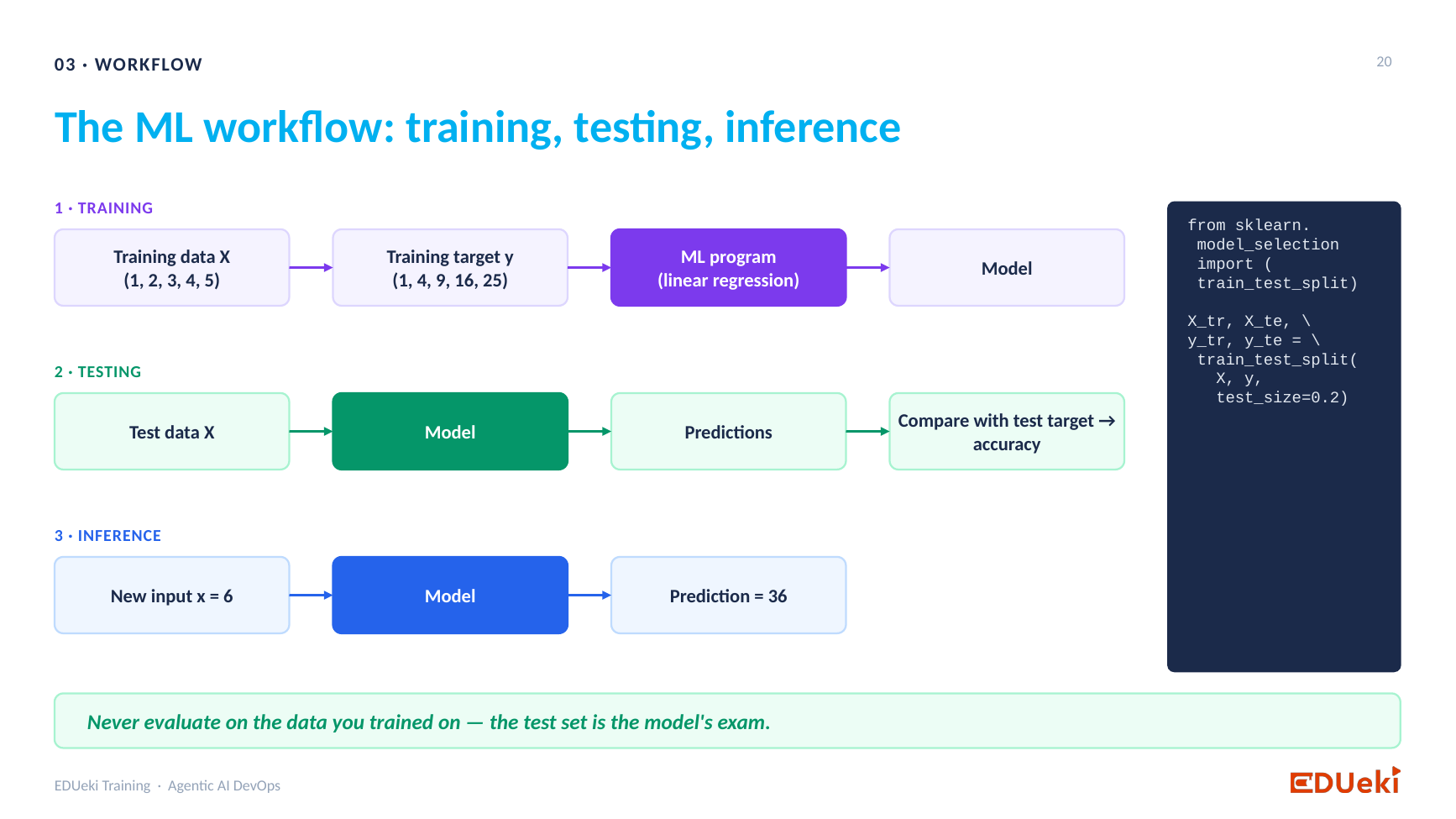
The ML workflow: training, testing, inference
The predictions are only a check, not a serviceInferenceNew data (no answers)Serve real predictions to real clients
| Stage | Data | Purpose |
|---|---|---|
| Training | Features and known answers (labels) | Learn the model parameters. |
| Evaluation | Test data (with known answers) | Measure and check the model’s accuracy and performance. |
Once you are happy with the score (about 98% here), the experiment is finished. The model is exported, and from now on you work in plain .py files, not in the notebook.
Analogy: a Java build produces a
.jar, and an application server such as Tomcat runs it as an API. In ML, training produces a model file, and an API server runs it.
2. Step 1: export the model
import joblib

joblib.dump(model, "loan.pkl")   # loan.pkl is the artifact, the trained model
3. Step 2: serve it as an API
A script runs and ends. An API runs 24×7, waiting for clients to call it. Two libraries do this job:
- FastAPI defines the endpoints (routes).
- Uvicorn is the application server that keeps the app running, the Tomcat of Python.
import joblib
import uvicorn
from fastapi import FastAPI

app = FastAPI(title="Loan Approval Model")
model = joblib.load("loan.pkl")        # load once, when the server starts

@app.get("/")                          # health check
def health_check():
    return {"status": "ok"}

@app.post("/predict")                  # predictions
def predict(application: LoanApplication):
    ...

if __name__ == "__main__":
    uvicorn.run("loan_api:app", host="0.0.0.0", port=9090, reload=True)
| Setting | Meaning |
|---|---|
"loan_api:app" |
file name loan_api.py, and the FastAPI object app inside it |
port=9090 |
the port the API listens on |
host="0.0.0.0" |
accept connections from any client |
reload=True |
restart automatically when the code changes |
Run it from the terminal inside the virtual environment: python3 loan_api.py. The command does not return, which shows it is now a running service.
Two common problems
- “Address already in use”: the port is taken. Choose another port.
- Red underlines in the IDE: the IDE is using a different Python interpreter. Run from the terminal, or select the virtual environment’s interpreter in the project settings.
4. Testing the API
- A browser always sends GET. Opening
/works, but/predictaccepts only POST, so the browser shows Method Not Allowed. /docsis interactive documentation (OpenAPI / Swagger UI) that FastAPI generates for you. Open an endpoint, choose Try it out, paste the request body and click Execute.- Postman also works: method POST, URL
http://localhost:9090/predict, headerContent-Type: application/json, and the JSON in the body.
Request body, and the response:
{
  "no_of_dependents": 3,
  "education": "Graduate",
  "self_employed": "No",
  "income_annum": 8200000,
  "loan_amount": 30700000,
  "loan_term": 8,
  "credit_score": 467,
  "total_assets": 52700000
}
{ "loan_status": "Rejected", "approval_probability": 0.0 }
5. The rules of inference
The model only understands data shaped exactly like its training data.
- Same features, same order. Training used
total_assets(the four asset columns combined), so the API must taketotal_assets. If a feature is missing, the model cannot predict. - Validate the request. A Pydantic class lists the required fields and types. A missing field returns a clear error (
422 Field required) instead of a crash. - Same preparation as training. Convert text to the same numbers (Graduate = 1, Not Graduate = 0, self employed No = 1, Yes = 0). The amounts also get the same log transform.
- Same data type. The model was trained on a pandas DataFrame, so the incoming JSON is turned into a DataFrame before
predict. - Translate the output. The model returns 1 or 0. The API returns Approved or Rejected, plus the probability from
predict_proba.
class LoanApplication(BaseModel):
    no_of_dependents: int
    education: str          # "Graduate" or "Not Graduate"
    self_employed: str      # "Yes" or "No"
    income_annum: float
    loan_amount: float
    loan_term: int
    credit_score: float
    total_assets: float

features = pd.DataFrame([{
    "no_of_dependents": application.no_of_dependents,
    "education": 1 if application.education == "Graduate" else 0,
    "self_employed": 1 if application.self_employed == "No" else 0,
    "income_annum": np.log(application.income_annum),
    "loan_amount": np.log(application.loan_amount),
    "loan_term": application.loan_term,
    "credit_score": application.credit_score,
    "total_assets": np.log(application.total_assets),
}])

approved = int(model.predict(features)[0]) == 1
6. Test with more than one case
Several weak applications still came back Approved. Printing the raw prediction showed that the model itself returned 1, so the API logic was correct and the behaviour came from the model and its data. An AI agent generated extra test requests, and those found Rejected cases.
Lesson: test the API with cases that should be approved and cases that should be rejected, and keep the JSON of each failing case so the issue is easy to reproduce.
7. Deploying the API on AWS EC2
The same code and model file now run on a remote server.
- Launch an EC2 instance and attach an IAM role that can read from S3.
- Copy the code (
loan_api.py) to the server. In real projects a CI/CD pipeline does this. - Move the model file through S3: upload
loan.pkl, then on the server runaws s3 cp s3://<bucket>/loan.pkl . - Install the dependencies. A brand-new server may not even have pip. Keep the packages in a
requirements.txt(below) so one command installs everything:python3 -m pip install -r requirements.txt - Start the API:
python3 loan_api.py - Open the port. In the instance’s security group, add an inbound rule for port 9090 (open to anywhere only for this demo).
- Call it:
http://<public-ip>:9090/docs. The same request now gets its answer from the remote server. A DNS A record can give the IP a friendly name.
requirements.txt
fastapi
uvicorn
pydantic
pandas
numpy
joblib
scikit-learn
scikit-learn is needed because the saved decision tree is a scikit-learn object, so it is required to load it.
8. Using an AI coding agent
- Claude Desktop (chat): paste the code and ask for a fix.
- Claude Code (agent): give it the folder path. It reads your code, the
loan.pklfile and the dataset, understands the project, and edits the files.
The agent turned a small fix request into a complete API with validation, so always read what it writes and understand each part. Use it for coding help, not as a replacement for understanding.
Summary
Key takeaways
- Evaluation checks a model. Inference serves it.
- Export the model as an artifact (
loan.pkl), then run it as an API with FastAPI and Uvicorn. GET /is the health check andPOST /predictreturns predictions.- At inference time, send the same features, in the same format, with the same encoding as in training.
- Test with
/docsor Postman, and with both easy and hard cases. - Deploying means: server, code, model file (via S3), dependencies, port open, then call the public address.
Quick revision
| Term | Meaning |
|---|---|
| Artifact | The saved trained model (loan.pkl) |
| FastAPI | Python framework that defines the endpoints |
| Uvicorn | Application server that keeps the API running |
| Endpoint | A URL path such as / or /predict |
| GET / POST | Ask for data / send data and get a result |
/docs |
Auto-generated interactive documentation (Swagger UI) |
| Pydantic | Validates the request fields and types |
requirements.txt |
The list of packages to install on any server |
Remember: export, serve, test, deploy.